# Xenos vs Extreme vs GH Injector: A 2026 Technical Comparison
Table of Contents
Started testing injectors again after a Windows 11 update killed my setup mid-session. Had been using one tool for months, then KB5079473 dropped and suddenly nothing worked. When I went looking for current info, most of what I found was AI-written fluff from 2023 recycling old forum posts with no actual testing.
Ended up running all three side by side on 24H2. Here is what I actually found.
Quick comparison
| Feature | GH Injector V4.8 | Extreme Injector v3.8 | Xenos (Blackbone) |
|---|---|---|---|
| Primary Edge | PDB Symbol Resolution | DLL Scrambling | Cross-Architecture Support |
| Stealth Level | High (PEB/Header Cloaking) | Moderate (Signature Hiding) | High (Kernel VAD Hiding) |
| OS Stability | 10/10 (Win 11 24H2) | 7/10 (Community Forks) | 8/10 (Legacy Support) |
GH Injector
GH Injector V4.8 is the one I kept coming back to. Most injectors hardcode function addresses inside ntdll.dll. Microsoft changes those on every patch cycle and the injector breaks. GH pulls PDB files from the Microsoft Symbol Server on first run instead, reads the current Windows build, finds the new offsets for things like LdrpLoadDllInternal, and adjusts. I have not seen another public tool that self-heals after an update like this.
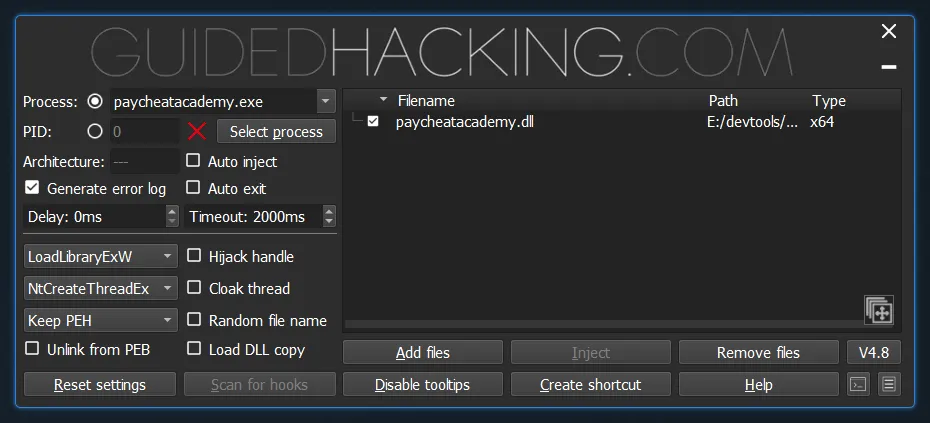
It also has execution methods most injectors skip. FakeVEH hijacks the process own exception handler instead of CreateRemoteThread. KernelCallback takes over a kernel-to-user callback path. QueueUserAPC queues an async call to make the injection look like normal system activity. Between these three you can usually find something that works even when the target is watching for CreateRemoteThread.
The GUI is ugly and setup takes a minute, but it works. I use this when stability matters.
Extreme Injector
Extreme Injector has been around forever. Original dev stopped working on it years ago, community forks kept it alive. v3.8 is what people use now.
What keeps Extreme relevant is DLL Scrambling. Standard injection leaves a signature basic scans catch. The scrambling options let you randomize export names so function signatures arent matching known patterns, erase PE headers after the DLL is loaded, and hide the module from InLoadOrderModuleList so Task Manager wont show it. I honestly forgot this was there until I tested it again. The GUI is the easiest of the three — drag a DLL in, pick a process, inject. I grab this for quick modding when I dont want to configure anything.
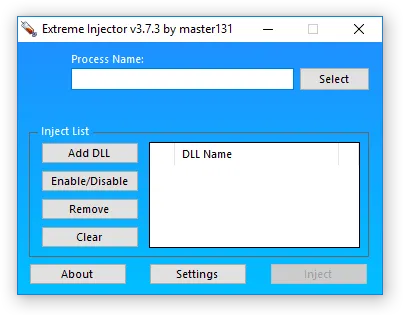
Downside is Windows 11 stability. Community forks help but its not as solid as GH. Expect crashes after updates.
Xenos
Xenos wraps the Blackbone library in a GUI. It does things the other two cant, specifically around architecture handling. The main sell is cross-architecture injection — if you need to inject a 64-bit DLL into a WOW64 (32-bit) process or vice versa, Xenos handles the translation logic that makes other injectors crash. For manual mapping across architectures its the most reliable I’ve found.
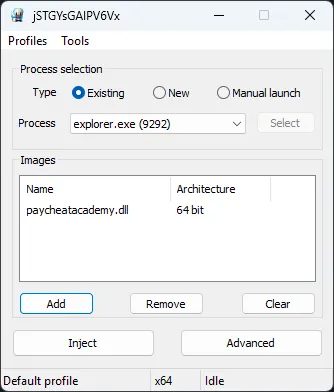
The manual mapper handles TLS callbacks, SEH so the target process doesnt crash if your DLL throws in private memory, and kernel VAD hiding with the optional Blackbone driver loaded. You probably wont need all of this, but when you do, the other two wont help.
I use Xenos for weird architecture barriers. If GH is the daily driver, Xenos is the specialist.
Method comparison
| Methodology | Xenos (Blackbone) | GH Injector V4.8 | Extreme Injector v3.8 |
|---|---|---|---|
| Manual Mapping | Best-in-class | Advanced (PDB-based) | Reliable (Scramble-ready) |
| LdrLoadDll | Supported | Supported (Internal variants) | Standard only |
| Thread Hijacking | Supported | Advanced | Basic |
| Shellcode Execution | Limited | Extensive (APC, VEH) | None |
Windows 11 24H2 reality
KB5079473 from early 2026 introduced a timing bug in the XAML shell. Some people see “Attach Failed” or “0x80073CF6” errors. Before you blame the tool, run through this list:
You need Admin privileges to write to another process memory. Windows blocks it without. All three tools need the VC++ 2022 x64 Redistributable installed or the exe wont even open. On 24H2 dont inject during the splash screen — wait for the main menu. And some apps have Force DEP or High Entropy ASLR turned on, which means you need to enable Ignore DEP or Relocation Support in Xenos or GH.
I spent an hour chasing a false positive on DEP before realizing the app just needed more time to load.
The anti-cheat angle
Stock versions of these injectors get flagged fast. Their signatures are public and kernel-level anti-cheats check for them. If you are using these against protected processes, you need to modify them first. For Xenos that means changing the Blackbone driver signature before building. For GH Injector you should proxy your PDB download requests because anti-cheats can see a request for ntdll.pdb from your IP during a game session. For Extreme, always use Scramble and Erase PE Headers at minimum.
Most bans are people running stock builds with zero modifications. The detection signatures have been public for years.
None of these three is perfect. I keep GH installed for anything that needs to survive updates, Extreme for when I just want to inject something fast without thinking about it, and Xenos for the weird cross-architecture stuff that makes the other two useless. Your call which problem you are solving.
For more tools, see the RE Toolkit.